
Home · SOP library · Shimadzu LCsolution
VA-SOP-LC-011 · Standard operating procedure
Manual integration in LCsolution — permitted tools and data-integrity rules
SOP with screenshots: LCsolution Manual Integration Bar tools, Reject Peak vs Unify Peaks, and the audit-safe way to undo manual events.
| SOP No. | VA-SOP-LC-011 |
|---|---|
| Revision | 00 |
| Effective date | 30 October 2026 |
| Review date | 30 October 2027 |
| Software | Shimadzu LCsolution 1.25 (Postrun Analysis), LC-2010 series HPLC |
1Purpose
To define how manual integration may be applied in LCsolution and how it must be reversed, so that results remain scientifically justified and traceable.
2Scope
Applies to LCsolution 1.2x Manual Integration Bar in LC Data Analysis.
3Responsibility
- Analyst — performs the procedure and records results.
- QC reviewer — verifies the output against the acceptance criteria.
- Lab in-charge / system administrator — controls method and report-format files and user rights.
4Definitions and abbreviations
| Reject Peak | Excludes a peak (e.g. noise) from the peak table. |
|---|---|
| Unify Peaks | Merges peaks in a time range into one. |
| Force B/V, Move BL | Change baseline type or position manually. |
5Prerequisites and materials
- Automatic integration optimised first (VA-SOP-LC-003).
- Reason for each manual event documented.
6Safety and precautions
- Manual integration must never be used to make a failing result pass. Unifying an impurity into the main peak is falsification.
7Procedure
-
7.1
Know the tools
Hover the Manual Integration Bar for tooltips: Move BL · Insert Peak · Split · Unify · Reject Peak(s) · Force B/V · Force T/L/N/NB.
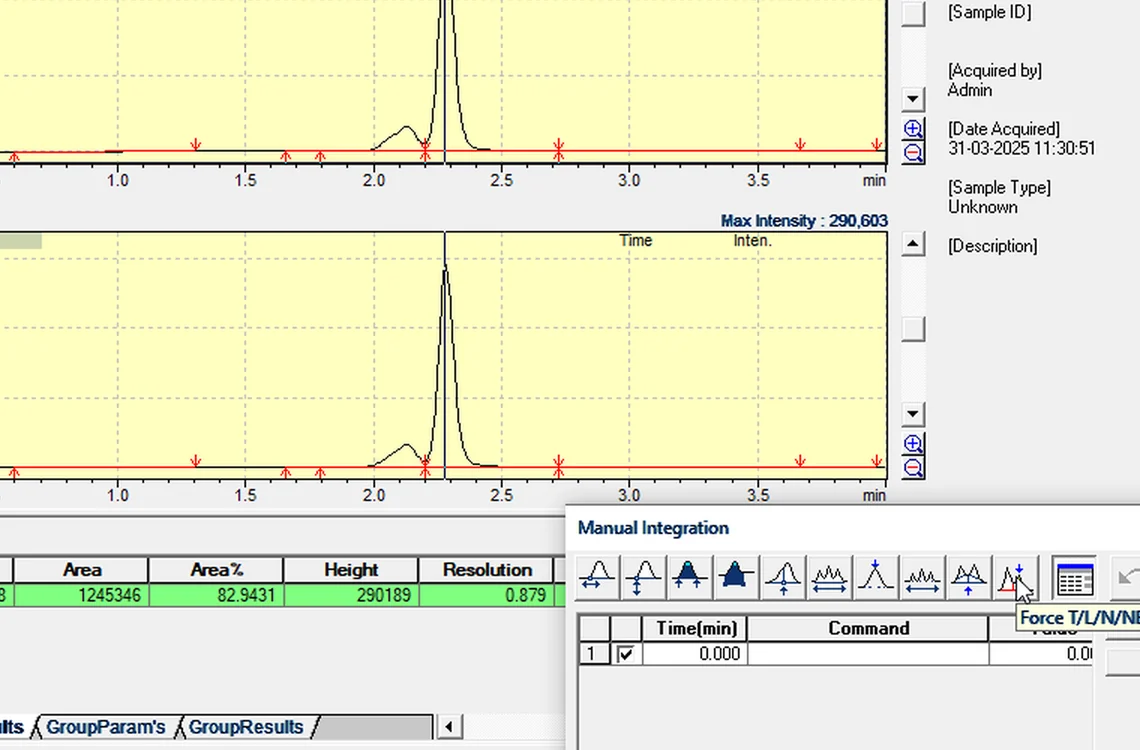
Fig. 7.1 — Know the tools -
7.2
Reject a noise peak
Reject Peak at 3.287 min → Analyze: the noise leaves the total (main peak Area % 82.94 → 84.29).
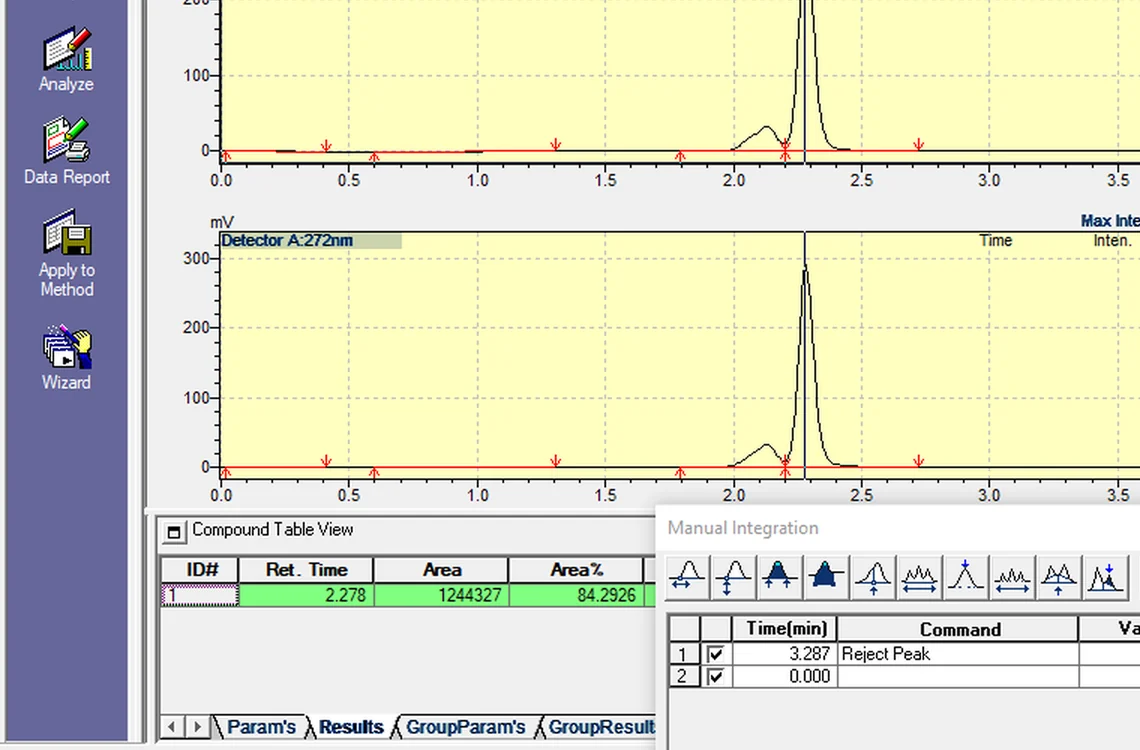
Fig. 7.2 — Reject a noise peak -
7.3
The tool that gets you in trouble
Unify Peaks 2.0–2.4 min makes the main peak 99.57 % — the impurity is hidden. Never unify to pass a specification.
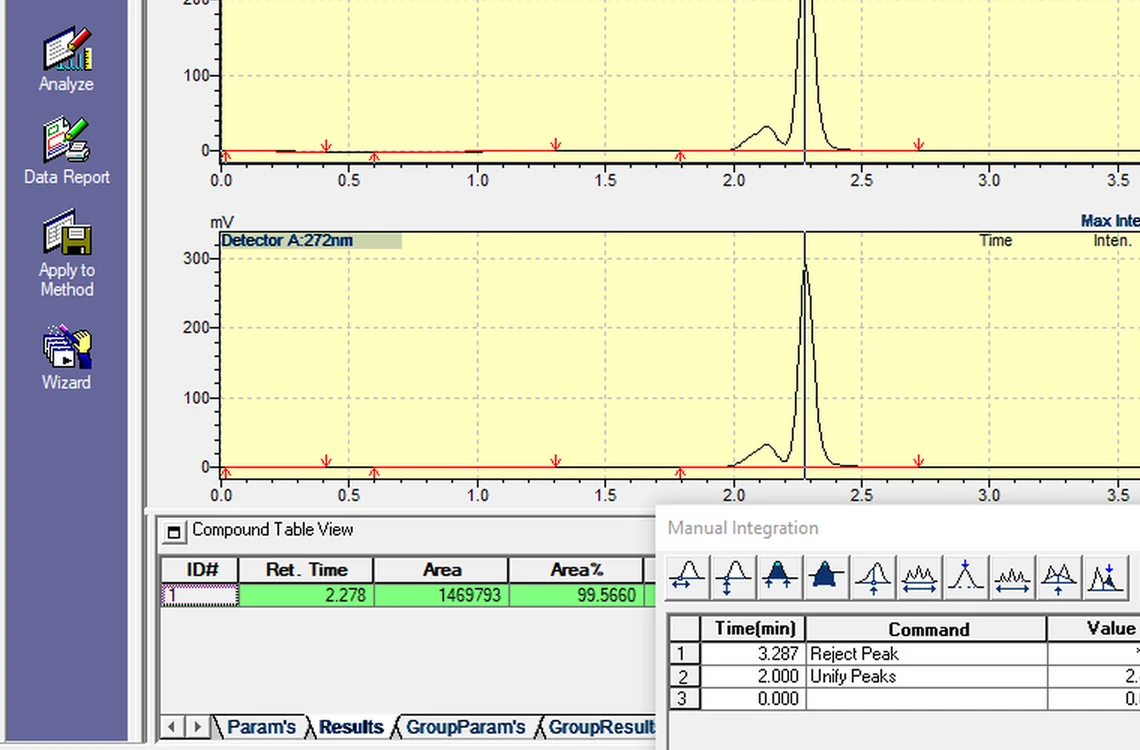
Fig. 7.3 — The tool that gets you in trouble -
7.4
Untick, don't delete
Untick the event → Analyze: result back to 1,244,327 / 84.29 %. The unticked event stays on record.
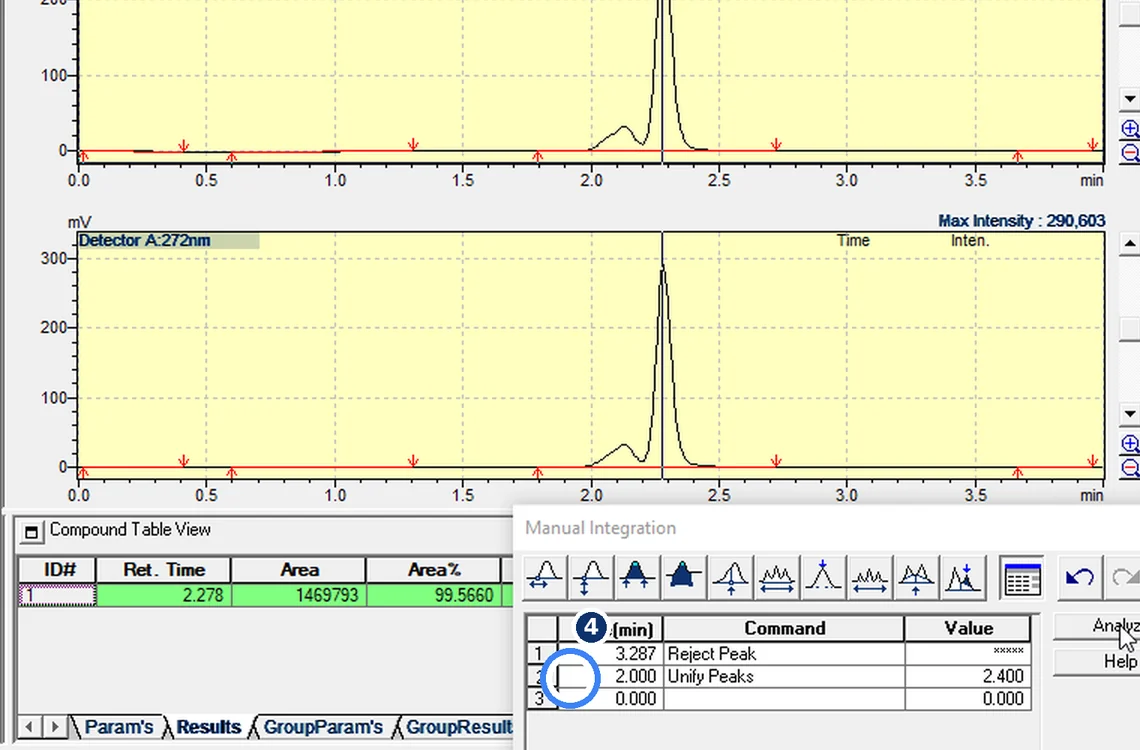
Fig. 7.4 — Untick, don't delete -
7.5
Rule
Fix integration with parameters first. Every manual event needs a reason — never hide a peak.
8Acceptance criteria and interpretation
- Each manual event has a documented reason; results with and without the event are explainable.
- Unticked events remain visible in the event list (traceable).
9Troubleshooting and common errors
| Symptom | Cause and fix |
|---|---|
| Result changed unexpectedly | Check the Manual Integration Bar for events added earlier. |
| Need to undo | Untick the event and Analyze — do not delete it. |
10References
- Shimadzu LCsolution Ver. 1.2x — Operation and Help documentation.
- USP <621> Chromatography.
- ICH Q2(R2) Validation of Analytical Procedures.
11Revision history
| Rev. | Date | Change |
|---|---|---|
| 00 | 30 October 2026 | First issue, written from the October 2026 screen recording. |
Frequently asked
Is manual integration allowed in LCsolution?
Only with a documented reason after automatic parameters are optimised. Never merge or reject a real peak to pass a specification.
Video version: LCsolution — Manual integration, and the tool that gets you in trouble (October 2026) — on our Instagram and YouTube.
Related SOPs
Vision Analytical is an independent service provider, not affiliated with Shimadzu Corporation or Waters Corporation. LCsolution and Empower are trademarks of their respective owners. Screenshots are from our own demonstration systems with demonstration data. Last updated 30 October 2026.