
Home · SOP library · Shimadzu LCsolution
VA-SOP-LC-003 · Standard operating procedure
Changing integration parameters (Width, Slope) in LCsolution and why they may have no effect
SOP with screenshots: change Width and Slope in LCsolution Data Analysis Parameters, and clear old manual integration events that override them.
| SOP No. | VA-SOP-LC-003 |
|---|---|
| Revision | 00 |
| Effective date | 30 October 2026 |
| Review date | 30 October 2027 |
| Software | Shimadzu LCsolution 1.25 (Postrun Analysis), LC-2010 series HPLC |
1Purpose
To change automatic integration parameters in LCsolution and to verify that no manual integration event overrides them.
2Scope
Applies to LCsolution 1.2x LC Data Analysis for any chromatogram processed with the Width/Slope integration algorithm.
3Responsibility
- Analyst — performs the procedure and records results.
- QC reviewer — verifies the output against the acceptance criteria.
- Lab in-charge / system administrator — controls method and report-format files and user rights.
4Definitions and abbreviations
| Width | Expected peak width at half height (s); smaller values separate narrow, close peaks. |
|---|---|
| Slope | Baseline slope threshold (uV/min) that decides peak start and end. |
| Manual integration event | A time-programmed instruction (Reject, Insert Peak, etc.) that overrides automatic integration. |
5Prerequisites and materials
- Data file (.lcd) open in LC Data Analysis.
- Rights to edit the method.
6Safety and precautions
- Work on a copy of data and method files until the change is approved.
- Never delete or overwrite raw data (.lcd) to obtain a passing result; every change must be traceable.
- Follow the laboratory's data-integrity and audit-trail SOP when LCsolution security is enabled.
7Procedure
-
7.1
Change Width and Apply
Method → Data Analysis Parameters → Integration: change Width (e.g. 5 → 3 s) and click Apply.
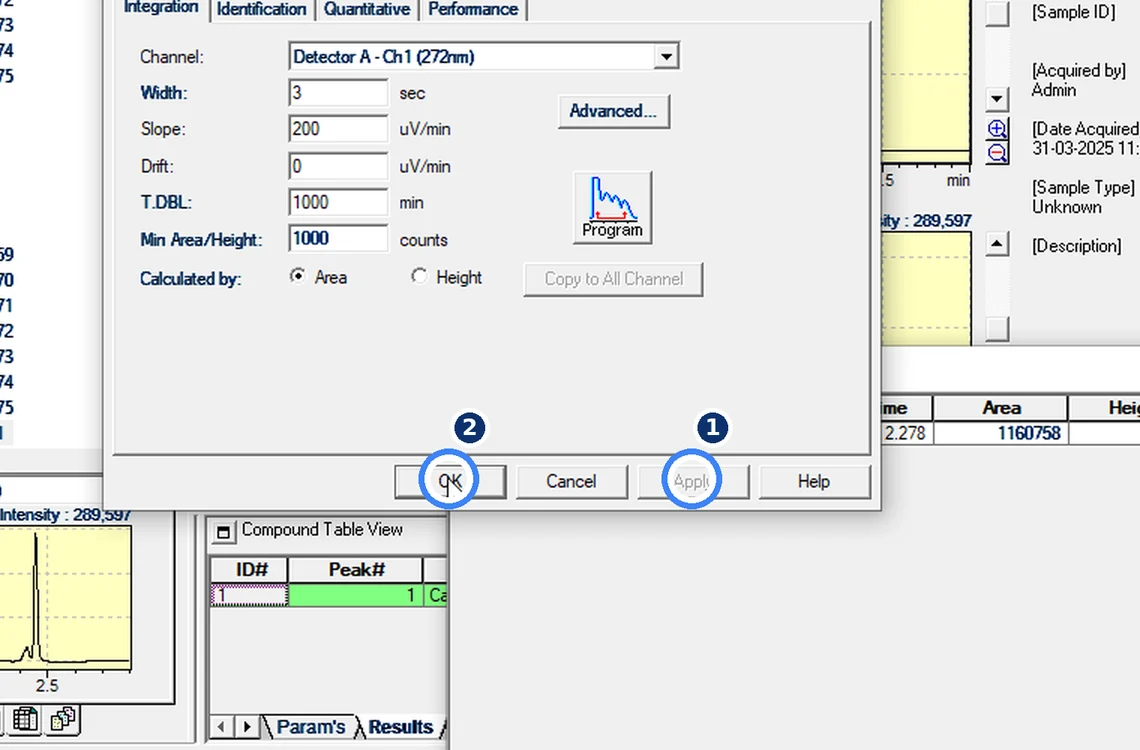
Fig. 7.1 — Change Width and Apply -
7.2
Check the peak table
If the table still shows one peak with the same area, the change has been overridden.
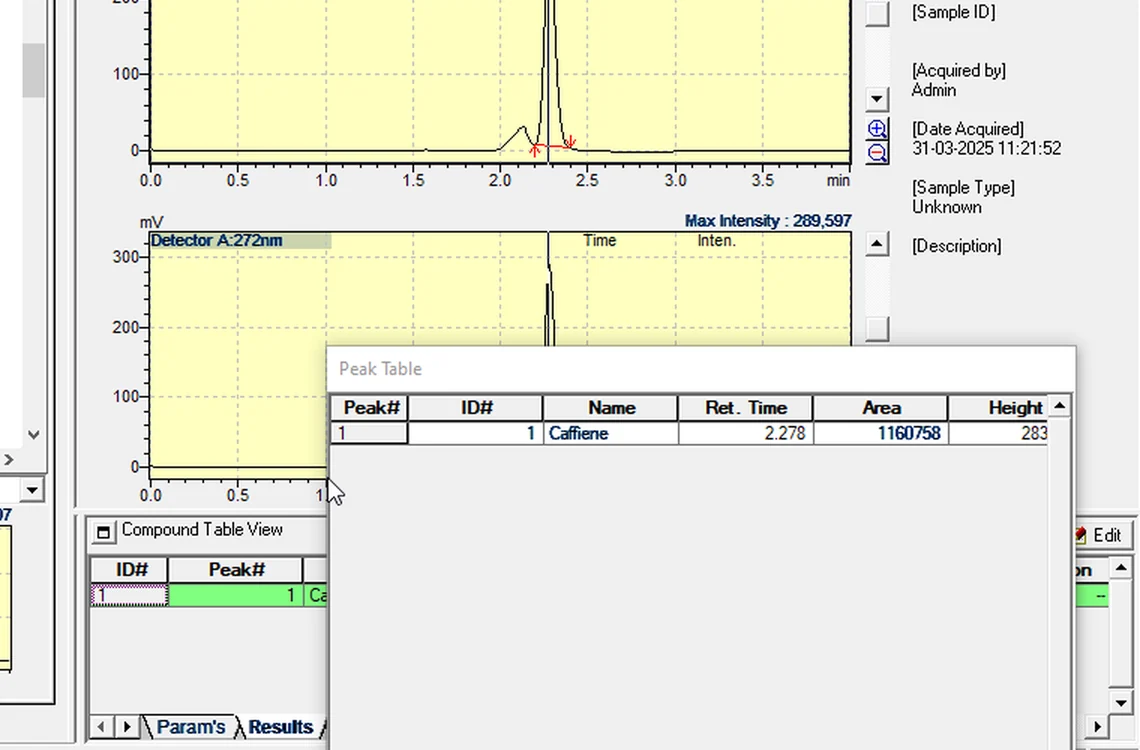
Fig. 7.2 — Check the peak table -
7.3
Open the Manual Integration Bar
View → Manual Integration Bar lists old events — here Reject Peaks at 0.349 min and Insert Peak at 2.200 min.
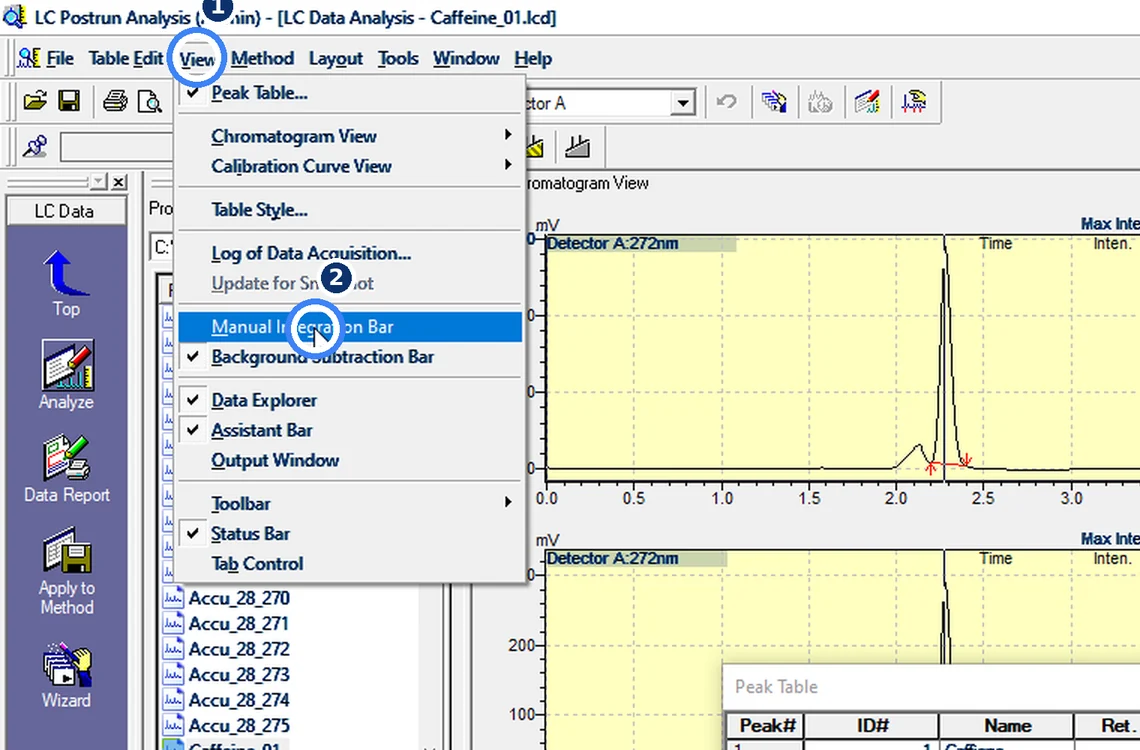
Fig. 7.3 — Open the Manual Integration Bar -
7.4
Untick the events and Analyze
Untick both events and click Analyze. The impurity at 2.12 min separates and the main-peak area changes from 1,160,758 to 1,246,213.
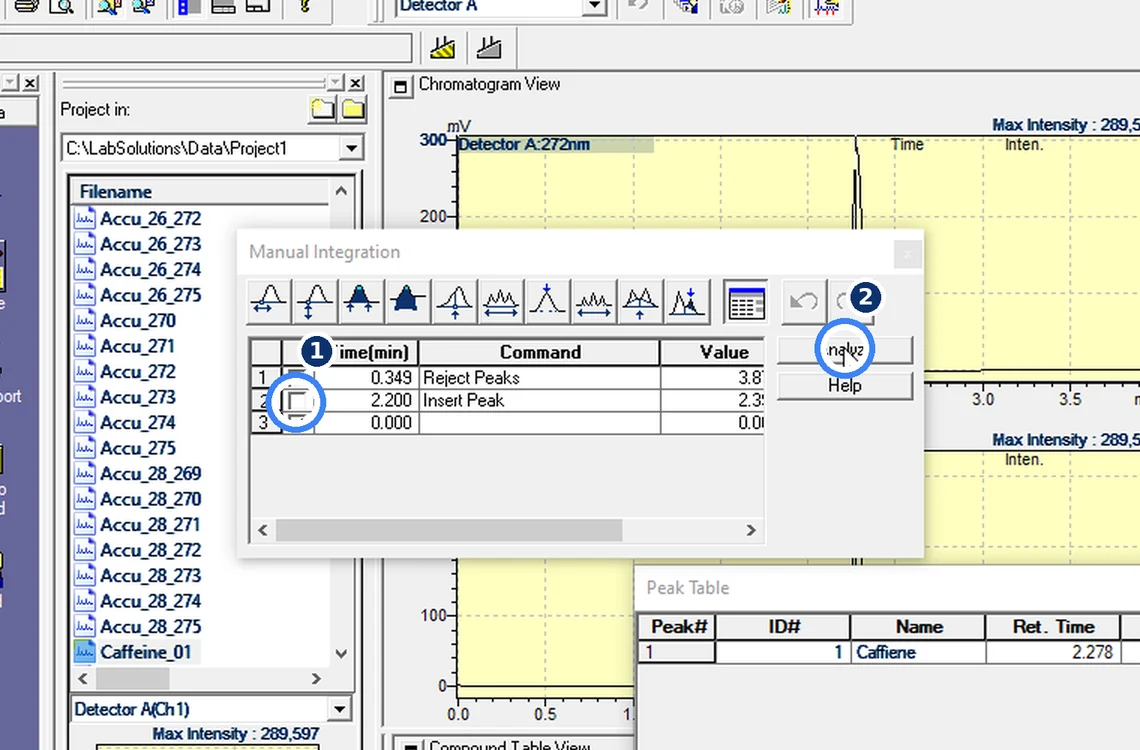
Fig. 7.4 — Untick the events and Analyze -
7.5
Rule
If integration parameters seem to do nothing, check the Manual Integration Bar first.
8Acceptance criteria and interpretation
- After Apply/Analyze the peak table reflects the new parameters (e.g. impurity at 2.12 min separated from the main peak).
- Manual Integration Bar shows no unintended events; any event kept has a documented reason.
9Troubleshooting and common errors
| Symptom | Cause and fix |
|---|---|
| Parameters change nothing | Manual integration events (Reject Peaks, Insert Peak) override parameters. Untick them in the Manual Integration Bar and Analyze. |
| Too many small peaks | Increase Min. Area or Slope instead of rejecting peaks one by one. |
10References
- Shimadzu LCsolution Ver. 1.2x — Operation and Help documentation.
- USP <621> Chromatography.
- ICH Q2(R2) Validation of Analytical Procedures.
11Revision history
| Rev. | Date | Change |
|---|---|---|
| 00 | 30 October 2026 | First issue, written from the October 2026 screen recording. |
Frequently asked
Why does changing Width or Slope in LCsolution do nothing?
An old manual integration event is overriding the parameters. Open View → Manual Integration Bar, untick the events and click Analyze.
Video version: LCsolution — Changed Width or Slope and nothing happens? (October 2026) — on our Instagram and YouTube.
Related SOPs
Vision Analytical is an independent service provider, not affiliated with Shimadzu Corporation or Waters Corporation. LCsolution and Empower are trademarks of their respective owners. Screenshots are from our own demonstration systems with demonstration data. Last updated 30 October 2026.